AWS Resource Architecture
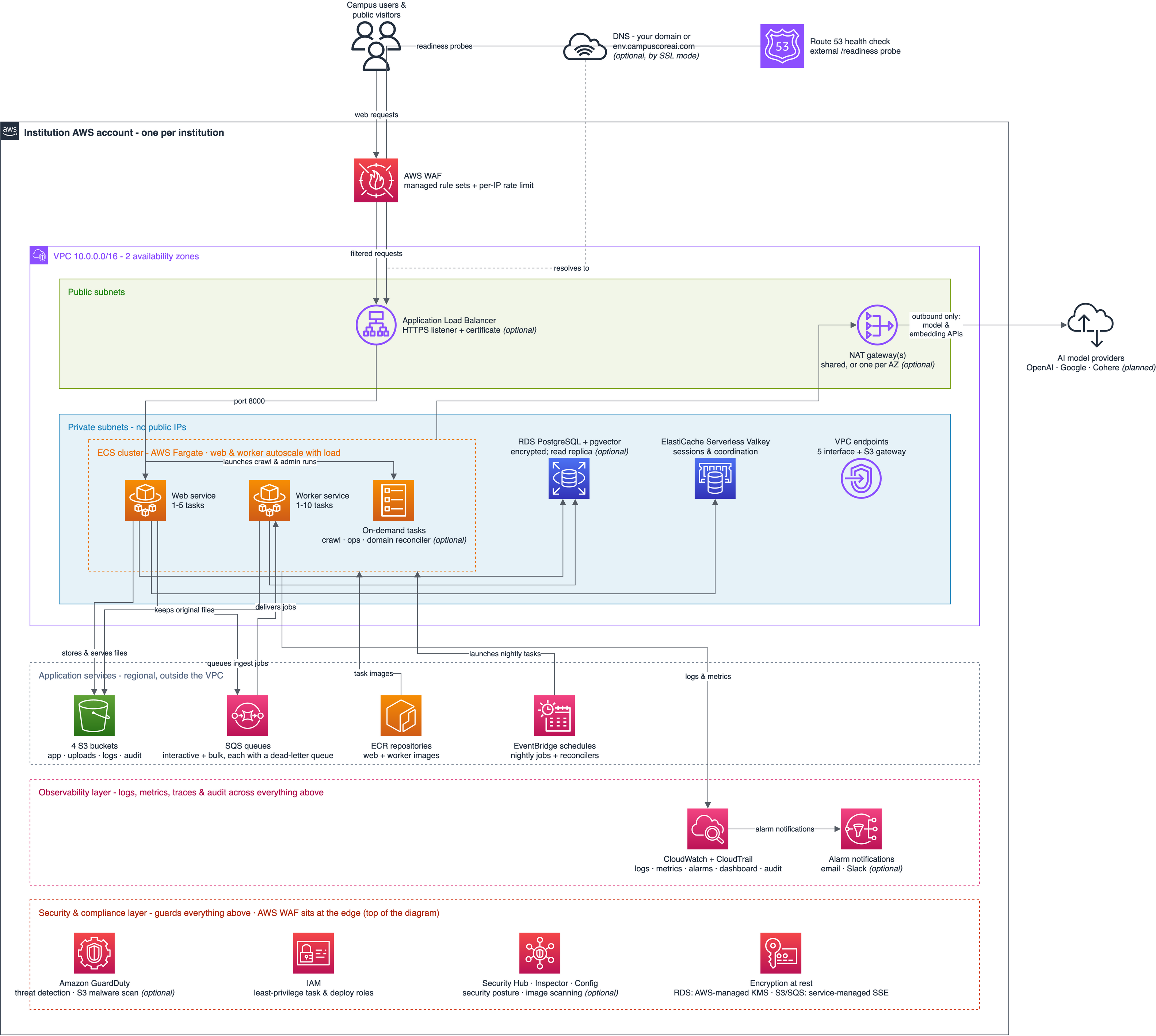
Everything CampusCore runs on is provisioned inside an AWS account your institution owns. The diagram below shows those resources - the network, the compute that runs the application, and the data, messaging, and monitoring services attached to them. It is the infrastructure view behind the Architecture Overview; for sizing and estimated cost, see What Gets Created in Your AWS Account.
Reading the diagram
The diagram uses AWS's standard icons and grouping - the notation your cloud and security teams already read.
- The box carrying the AWS logo is your AWS account; every resource inside it is created by our deployment automation, and nothing is shared with any other institution.
- Outside that box sit your users and the two external services: the AI model providers, and the DNS name that points at your deployment.
- An italic (optional) in a label marks a resource that only some deployments have; for example the HTTPS certificate path depends on your SSL setup, and the database read replica is an opt-in for larger deployments.
- Everything holding data sits in the private subnets, the blue band: the application tasks, the database, and the cache have no public IP addresses, and the load balancer in the public subnets above - protected by the AWS web application firewall - is the only public entry point.
- Outbound calls to the AI providers leave through NAT gateways - one shared by default, or one per availability zone for resilience - so nothing inside the network is reachable from the internet; traffic to AWS's own services stays on AWS's private network through VPC endpoints.
- Below the network, two full-width layers group the services that watch and guard the whole deployment. The observability layer carries CloudWatch logs, metrics and alarms and CloudTrail audit; the security & compliance layer carries the optional posture services - Amazon GuardDuty threat detection with malware scanning of uploaded files, and AWS Security Hub with Inspector and Config for continuous configuration and image checks - along with least-privilege IAM roles and the encryption-at-rest summary: the database encrypts with AWS-managed KMS keys, storage and queues use AWS's service-managed encryption, and the application's own credentials are held as encrypted parameters that AWS decrypts and hands to each task as it starts.