AWS Resource Architecture (client-facing)
This is the AWS resource diagram we share with universities: what a standard CampusCore deployment actually provisions in the institution's own AWS account, from the network layer through compute, with the data, messaging, and supporting services drawn where they attach.
It is the infrastructure companion to the component-level Architecture Overview - that diagram says what the platform does; this one says what backs it.
The Terraform under infrastructure/ is the source of truth; the mapping table below ties every box to its defining files.
The diagram
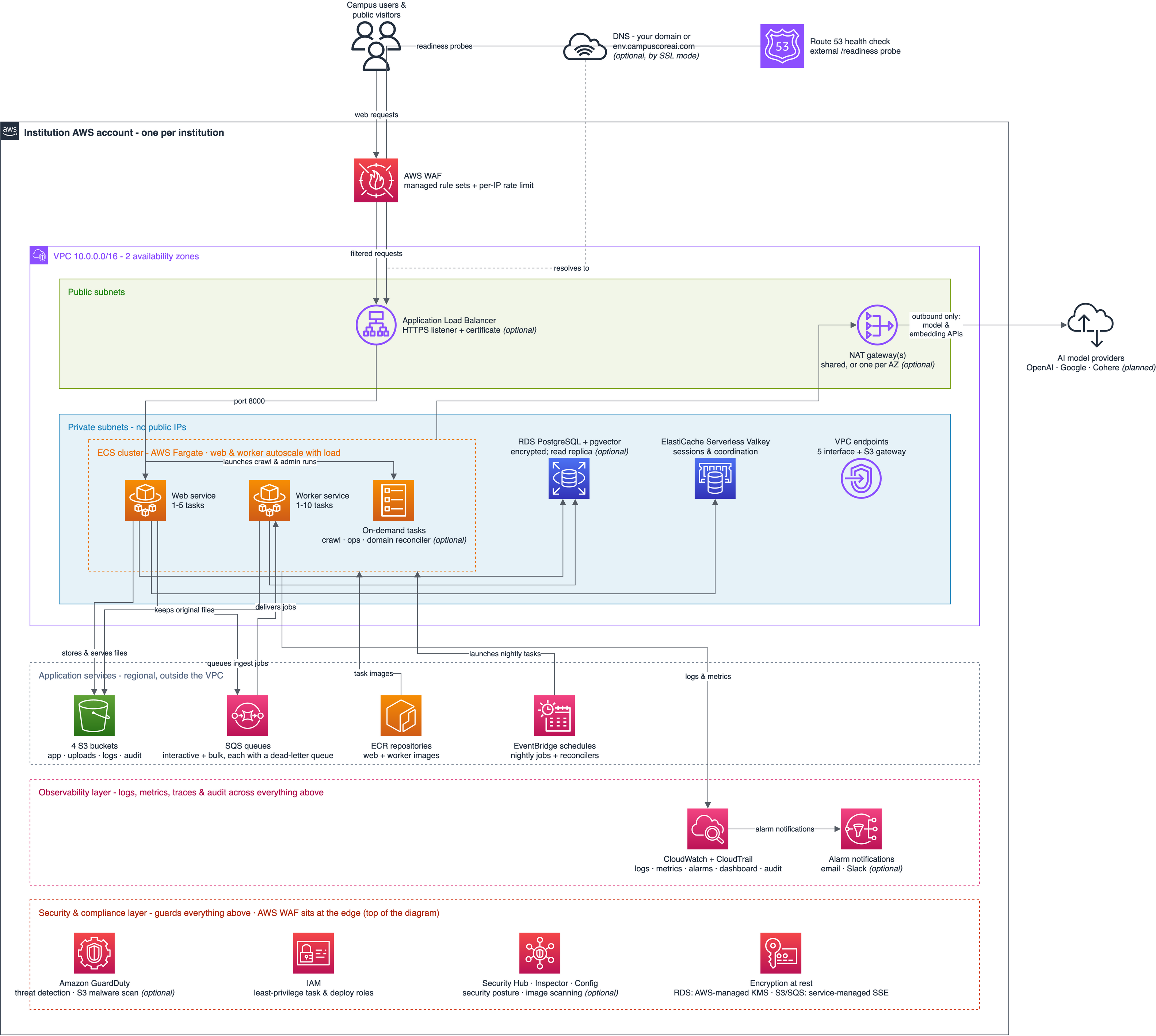
The editable source is assets/aws-resource-architecture.drawio, a draw.io (diagrams.net) file drawn with the official AWS 2019 icon set. The PNG above is its 2x export; when the diagram changes, both files change together. The "Exporting the image" section below covers regeneration.
Reading the diagram
The diagram uses AWS's own icon language rather than the overview's house style, so an institution's cloud or security reviewer sees the notation they already know.
- The dark-bordered box carrying the AWS logo is the institution's own AWS account; every resource inside it is created by our Terraform, and nothing is shared with any other institution.
- Outside the account sit the campus users at the top and, drawn as dark clouds, the two external parties: the AI model providers and the DNS name that points at the deployment.
- Inside the account, the purple border is the VPC; the green-edged band at the top holds the public subnets, and the blue band below it the private subnets, where the application tasks, the database, and the cache live without public IP addresses.
- The dashed orange box is the ECS cluster.
- Below the VPC, three dashed full-width bands layer the rest of the account by function: the gray application-services band (storage, queues, images, schedules), the pink observability layer, and the red security & compliance layer. The two lower bands stretch across the whole diagram because their services watch or guard everything above them rather than sitting on any one data path.
- An italic (optional) in a label marks a resource that only some deployments have; the "Optional per deployment" section below names the exact switch for each.
- The VPC endpoints icon is plumbing rather than a traffic hop: it keeps the tasks' traffic to S3, ECR, CloudWatch Logs, SQS, and SSM on AWS's own network instead of the public internet.
- The observability layer holds CloudWatch and CloudTrail with the alarm-notification path. The in-app trace store (OpenTelemetry spans in PostgreSQL, read by the agent traces console) is deliberately not drawn: the diagram is client-facing, and from a client's perspective observability is CloudWatch.
- The security & compliance layer holds the optional security posture services - GuardDuty threat detection with malware scanning of the upload bucket, Security Hub with Inspector and AWS Config, and the account-wide hardening settings - plus IAM's least-privilege task and deploy roles and the encryption-at-rest box, which is a statement rather than a resource: RDS encrypts with the AWS-managed KMS key, S3 and SQS use their service-managed server-side encryption, application secrets are SSM SecureString parameters, and the CloudTrail stream uses a customer-managed key. AWS WAF belongs to this layer too but stays at the top of the diagram, on the request path it filters.
- Arrow labels carry behavior where the path alone does not state it; the unlabeled arrows - the services into their database and cache, and the ECS cluster into the NAT gateway - are plain reads-and-writes and routing.
What each box maps to in Terraform
The reusable resource shapes live in infrastructure/modules/; the infrastructure/base/ layer instantiates the stable resources and infrastructure/app/ the per-deploy ones.
| Diagram box | AWS resources | Terraform home |
|---|---|---|
| VPC, subnets, NAT gateway(s), routing, flow logs | aws_vpc, aws_subnet x4, aws_internet_gateway, aws_nat_gateway (one shared, or one per AZ with enable_per_az_nat), route tables, aws_flow_log |
infrastructure/modules/networking/, via infrastructure/base/networking.tf |
| VPC endpoints | 5 aws_vpc_endpoint (Interface) + 1 (Gateway, S3) |
infrastructure/base/endpoints.tf; the S3 gateway in infrastructure/modules/networking/main.tf |
| Application Load Balancer | aws_lb (deletion-protected, invalid header fields dropped), target group, security groups; when SSL is on, an HTTPS listener (TLS policy ELBSecurityPolicy-TLS13-1-2-Res-PQ-2025-09) and no port-80 listener or ingress; when SSL is off, a forwarding HTTP listener |
infrastructure/modules/ecs_cluster/main.tf, infrastructure/base/alb.tf |
| AWS WAF | aws_wafv2_web_acl (REGIONAL) + ALB association + logging |
infrastructure/modules/waf/, via infrastructure/base/waf.tf |
| DNS + certificate | Route53 CNAME (CampusCore admin account) + aws_acm_certificate (client account) |
infrastructure/modules/subdomain/, via infrastructure/base/dns.tf |
| ECS cluster | aws_ecs_cluster with Container Insights + the shared log group |
infrastructure/modules/ecs_cluster/main.tf, via infrastructure/base/ecs.tf |
| Web service | task definition + service + CPU-target autoscaling; every task definition runs its containers as uid 10001 on a read-only root with a writable /tmp volume |
infrastructure/app/web.tf, the shared hardening local in infrastructure/app/main.tf |
| Worker service | task definition + service + queue-backlog autoscaling | infrastructure/app/worker.tf |
| On-demand tasks | task definitions launched via ecs:RunTask |
infrastructure/app/crawler.tf, infrastructure/app/ops_task.tf, infrastructure/app/custom_domain_reconciler.tf |
| RDS PostgreSQL | aws_db_instance + parameter groups + optional replica, both with 60-second enhanced monitoring through one monitoring role |
infrastructure/modules/rds/, via infrastructure/base/rds.tf |
| ElastiCache Serverless | aws_elasticache_serverless_cache (Valkey) |
infrastructure/modules/elasticache/, via infrastructure/base/cache.tf |
| S3 buckets | 4 aws_s3_bucket with SSE, public-access blocks, TLS-only policies |
infrastructure/modules/s3_bucket/, via infrastructure/base/s3.tf |
| SQS queues | 2 work queues + 2 dead-letter queues, SSE on | infrastructure/modules/sqs_queue/, via infrastructure/base/sqs.tf |
| ECR repositories | 2 aws_ecr_repository with immutable tags, scan-on-push and a four-rule lifecycle policy: the two most recent images per base-cache family are protected, deploy builds keep a floor of the last 5, and untagged orphans expire after 7 days |
infrastructure/modules/ecr_repo/, via infrastructure/base/ecr.tf |
| EventBridge schedules | aws_scheduler_schedule + per-schedule IAM role, one pair per job |
infrastructure/modules/scheduled_ecs_task/, via infrastructure/app/schedules.tf |
| EventBridge task-stop rules | 2 aws_cloudwatch_event_rule + ECS target + per-rule IAM role: one reconciles a crawl run and one an admin-operation run when its ECS task stops |
infrastructure/modules/ecs_task_event_rule/, via infrastructure/app/reconcile_events.tf |
| CloudWatch + CloudTrail | log groups, 31 metric alarms, the availability dashboard, aws_cloudtrail into the log archive |
infrastructure/app/monitoring.tf, infrastructure/app/availability.tf, infrastructure/base/cloudtrail.tf |
| Route 53 health check | external /readiness probe feeding the availability number |
infrastructure/app/availability.tf |
| SNS alerts | aws_sns_topic + optional email subscription + optional EventBridge-to-Slack delivery |
infrastructure/modules/sns_alert_topic/, infrastructure/modules/slack_alarm_notifier/ |
| GuardDuty, Security Hub, Inspector, AWS Config | aws_guardduty_detector + feature resources + malware protection plan, aws_securityhub_account + FSBP standard subscription, aws_inspector2_enabler + documented suppression filters for CVEs with no shipped fix, Config recorder + delivery channel |
infrastructure/modules/guardduty/, aws_config/, security_hub/, inspector/, via infrastructure/base/security_services.tf |
| Account-wide hardening | S3 account public-access block, EBS encryption by default, snapshot public-access block, SSM document public sharing disabled, SSM Automation script logging to CloudWatch, VPC Block Public Access with an exclusion for the app VPC, IAM password policy, SECURITY alternate contact | infrastructure/base/account_hardening.tf |
| CloudTrail encryption + monitoring | aws_kms_key with rotation + alias, the trail's CloudWatch log group, and the write-only delivery role |
infrastructure/base/cloudtrail.tf |
| IAM | shared task + execution roles, reconciler role, per-schedule roles; the deploy role is the CloudFormation stack infrastructure/deploy-roles/deploy-role.yaml |
infrastructure/modules/ecs_iam/, infrastructure/app/custom_domain_reconciler.tf |
Optional per deployment
A standard deployment creates everything above except the pieces behind these switches. Each switch is a Terraform variable fed from the deployment's GitHub Environment.
| Optional piece | Switch | Default |
|---|---|---|
HTTPS listener in place of the HTTP listener, env.campuscoreai.com CNAME, ACM certificate |
ssl_mode (off / self_managed / managed) |
off in test environments; real client deployments run self_managed or managed |
| Custom-domain reconciler task, its schedule, and its IAM role | ssl_mode other than off; certificate management only under managed |
follows ssl_mode |
| RDS read replica | enable_read_replica |
off |
| Alarm email delivery | alert_email |
off (the SNS topic always exists) |
| Alarm Slack delivery (EventBridge API destination) | slack_alert_webhook_url |
off |
| Nightly vector-index auto-rebuild schedule | enable_index_maintenance_schedule |
on |
| CloudTrail S3 data events | enable_cloudtrail_data_events |
on |
| Security posture services: GuardDuty (threat detection, upload malware scanning, runtime monitoring), AWS Config recording, Security Hub (FSBP standard), Inspector scanning of images, instances and functions with documented no-fix suppressions, and the account-wide hardening settings | enable_full_aws_security_services |
off; production client environments run it on |
| One NAT gateway per AZ instead of a single shared one | enable_per_az_nat |
off |
Scheduled jobs
EventBridge Scheduler launches standalone Fargate tasks from the worker image; none of these run inside the web or worker services.
Times are UTC.
In AWS the names carry the environment: campuscore-env-audit-export and so on, except the domain reconciler, which is named custom-domain-reconciler-env.
The two reconcilers are daily cleanup rather than the primary trigger.
A crawl or admin-operation run is reconciled the moment its ECS task stops, by the event rules in infrastructure/app/reconcile_events.tf; the schedule catches a stop event nothing acted on, and a row orphaned before its task handle was saved.
A sweep that reconciles anything says so in Slack, because with the event path healthy that count is zero.
By the time the sweep runs, ECS no longer describes the task, so a run the event path missed is closed without its outcome; the task's logs still hold it, and the recovery is a re-run.
| Schedule | What it runs | Cadence | Optional |
|---|---|---|---|
abandoned-reconcile |
reconcile_abandoned_ingestion_runs |
daily 05:00 | no |
ops-reconcile |
reconcile_operation_runs |
daily 05:30 | no |
crawl-reconcile |
reconcile_crawl_runs |
daily 05:45 | no |
audit-export |
export_audit_logs |
daily 01:30 | no |
audit-prune |
prune_audit_logs |
daily 02:00 | no |
analytics-rollup |
rollup_analytics |
daily 02:45 | no |
traces-prune |
prune_traces |
daily 03:15 | no |
session-prune |
prune_expired_sessions (wraps clearsessions) |
daily 03:45 | no |
under-extracted-sweep |
sweep_under_extracted |
daily 07:00 | no |
auto-rebuild |
auto_rebuild_if_justified |
daily 06:00 | yes - enable_index_maintenance_schedule |
custom-domain-reconciler |
reconcile_custom_domains |
every 5 min, created disabled and toggled at runtime | yes - ssl_mode |
Alarms
Thirty-one CloudWatch alarms watch the deployment, all delivering to the SNS topic; custom metrics live in the CampusCore namespace, dimensioned by deployment.
The availability probe alarm is created in us-east-1 (where Route 53 metrics live) and only for us-east-1 deployments - see Availability Measurement for the caveat.
Four are conditional: the two custom-domain health alarms and the attached-certificate alarm exist only where ssl_mode is not off, and the default-certificate alarm only where a subdomain has been provisioned for it to name.
| Family | Alarms |
|---|---|
| Availability | external readiness probe failing |
| HTTP | 5xx error rate, p95 latency |
| Chat | error rate, p95 latency |
| Agent | error rate, max-iterations rate, p95 iterations |
| Retrieval | p99 latency, empty-result rate, hard-error rate |
| Model providers | LLM call error rate |
| Web tasks | unhealthy count, CPU, memory |
| Worker tasks | unhealthy count, CPU, memory |
| Queues | bulk queue depth, bulk dead-letter queue not empty, interactive queue stalled, bulk queue stalled |
| Load balancer | target group with no healthy host, ALB-generated 5xx rate |
| Certificates | default certificate expiring, an attached custom-domain certificate expiring |
| Custom domains | health monitor stale, health monitor blind |
| Sign-in | attempts reaching no success |
| Task-stop reconcile rules | crawl-reconcile rule failed invocations, ops-reconcile rule failed invocations |
How the resources get created
Deploys run from GitHub Actions with no long-lived AWS keys.
The workflow assumes CampusCore-Admin-Role in the CampusCore admin account through GitHub's OIDC provider; that role holds only the Terraform state and the campuscoreai.com DNS zone, and its one cross-account permission is assuming the CampusCore-Deploy-Role that the institution created in its own account from our CloudFormation template.
Terraform then applies the base layer (network, data stores, cluster, edge) and the app layer (task definitions, services, schedules, alarms) with that role.
Application data never leaves the institution's account; the only artifact stored on our side is the Terraform state.
Exporting the image
Edit assets/aws-resource-architecture.drawio in draw.io - app.diagrams.net or the desktop app - and export with File -> Export as -> PNG at 200% zoom, background on. Overwrite assets/aws-resource-architecture.png with the export and commit both files together: the PNG is the render that GitHub, the docs portal, and client decks all show, so the pair must never drift. Expect a noisy diff after an editor round-trip - draw.io rewrites the XML on save - so small label edits are easier made directly in the file. Unlike the Architecture Overview there is no export harness page - draw.io's own exporter replaces it.
Where this diagram is published
The client docs portal serves a client-worded page, product/aws-resource-architecture.md, which pulls the image embed from this file via a snippet include - the Markdown between the --8<-- markers above is the single source, and both pages show the same committed PNG.
The image path inside the markers is written relative to a sibling of docs/project/ (../project/assets/...) so that the identical text resolves from this file and from the including page under docs/product/.
The .drawio source ships in the portal build too - static files are not audience-filtered - which is fine: it holds nothing beyond the diagram the page already shows.